AI practice mode for sales roleplay
AI practice mode for sales roleplay is voice-to-voice rehearsal against a simulated buyer. You pick a customer persona and start a session. Within a second or two you are on a live voice call: the AI customer speaks first, in a real voice, and it interrupts, pushes back and goes off-script the way a real prospect does. You talk out loud, so there is no typing and no chat box. In CallPrompter, the prompter overlay you use on a real call runs during the session, on the same scripts, so the drill and the live call are the same conversation with different stakes.
How a practice session works
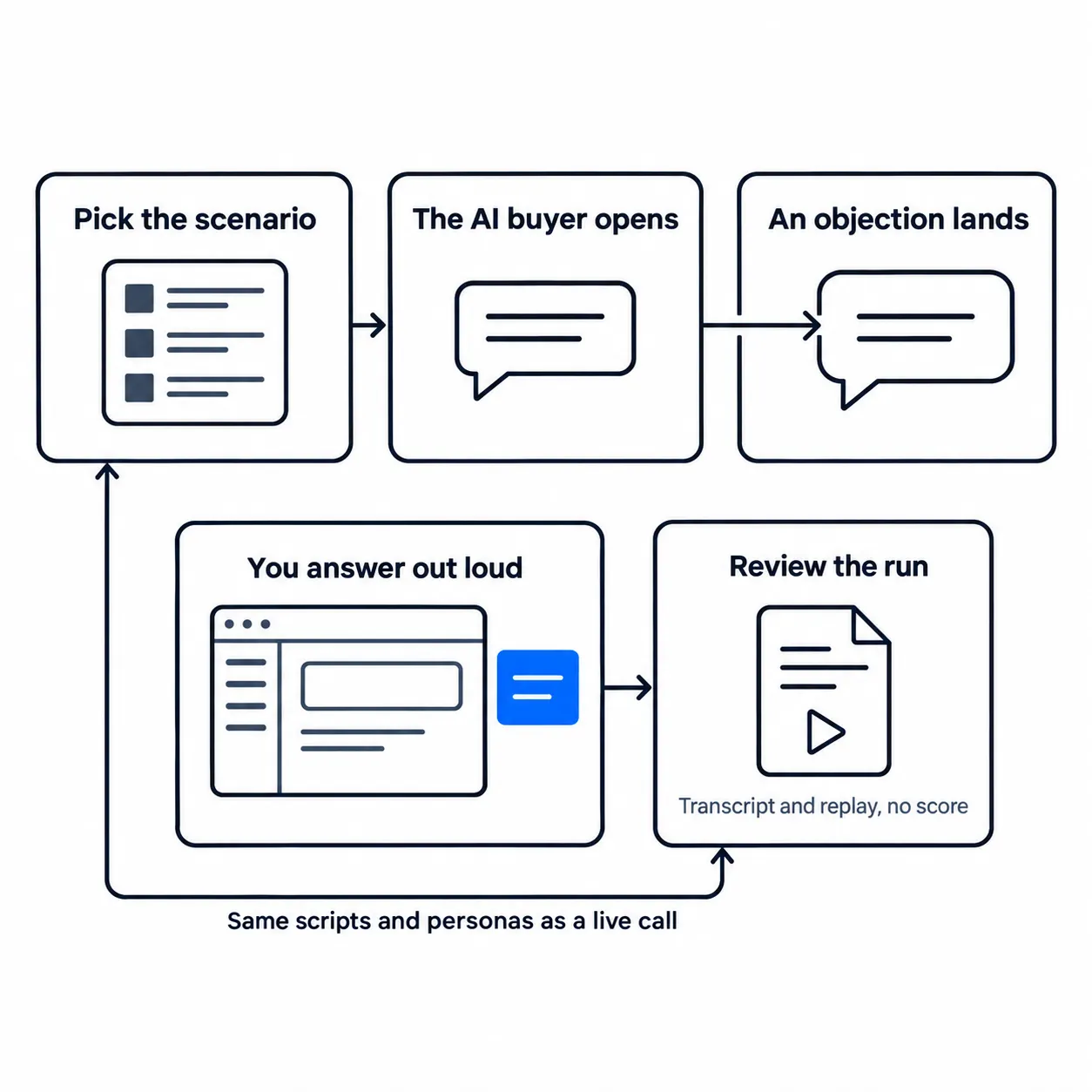
Five steps, start to finish.
- Pick the scenario. You choose a customer persona attached to your script and start the session. The persona and the script decide what the buyer knows, what it wants, and which objections it is likely to raise.
- The AI buyer opens the call. Within a second or two you are in a voice conversation. The customer speaks first, in a real voice, rather than waiting to be prompted.
- An objection lands. The buyer interrupts, pushes back and goes off-script. That behavior is deliberate. The objection you can handle is the one you saw coming, and a simulated buyer who waits politely for you to finish teaches you to deliver a monologue.
- You answer out loud, with the overlay running. Small prompt bubbles appear beside your window with the next discovery question, the answer written into your script for the objection you just heard, or a direction cue such as “slow down” or “ask about budget”. Only you see them.
- You review the run. Afterward you get the full transcript and can replay the session in History, so you can see where you rambled and where you missed the objection. CallPrompter does not grade the run, and the section on where practice mode falls short says what that costs you.
If discovery is the part of the call you want to rehearse, how a new SDR practices the next discovery question and then sees it live follows one script from the practice run into the real call, including why a run always starts at the opening.
Your scripts, personas and objection library live in the web application, and practice mode reads the same ones your live calls run on. If you have not built a script yet, the free AI sales script generator produces a first version you can edit.
What separates practice mode from post-call review
Practice mode and post-call review sit at opposite ends of the same call. As we set it out in our own write-up of conversation intelligence or live coaching, post-call analysis records a real conversation with a real prospect and produces an assessment afterward: talk ratios, topics covered, coaching notes a manager reads. Practice mode puts a rep into a simulated conversation before any prospect is involved, and the help arrives while the rep is still speaking.
The practical difference is who pays for the mistake. Under post-call review, the rep learns from a deal that is already won or lost. In practice mode, the rep makes the mistake against a simulated buyer, and it costs nothing.
CallPrompter is not a post-call conversation-intelligence tool and does not produce an analysis after the call. It works during the call, for the person on it.
| What differs | AI practice mode | Post-call review |
|---|---|---|
| Who is on the other end | A simulated buyer, before any prospect is involved | A real prospect, on a real deal |
| When the help arrives | While the rep is still speaking | After the call has ended |
| What exists afterwards | The full transcript and a session replay | An assessment: talk ratios, topics covered, coaching notes |
| Who pays for the mistake | Nobody, the run costs nothing | The deal that is already won or lost |
| Does CallPrompter do this | Yes | No, it works during the call, for the person on it |
The two ends of the same call, compared. CallPrompter, as of 09.09.2026.
How fast the response appears, and what the 485 millisecond figure covers
CallPrompter’s own measurement puts objection detection at 485 milliseconds, from the point where the model has enough of the buyer’s speech to classify the objection, to the point where the response is ready. The overlay in a practice session runs the same way it does on a live call: it follows the conversation, detects an objection, and surfaces the response written into your script. Detection runs while the buyer is still talking, so it does not wait for a pause.
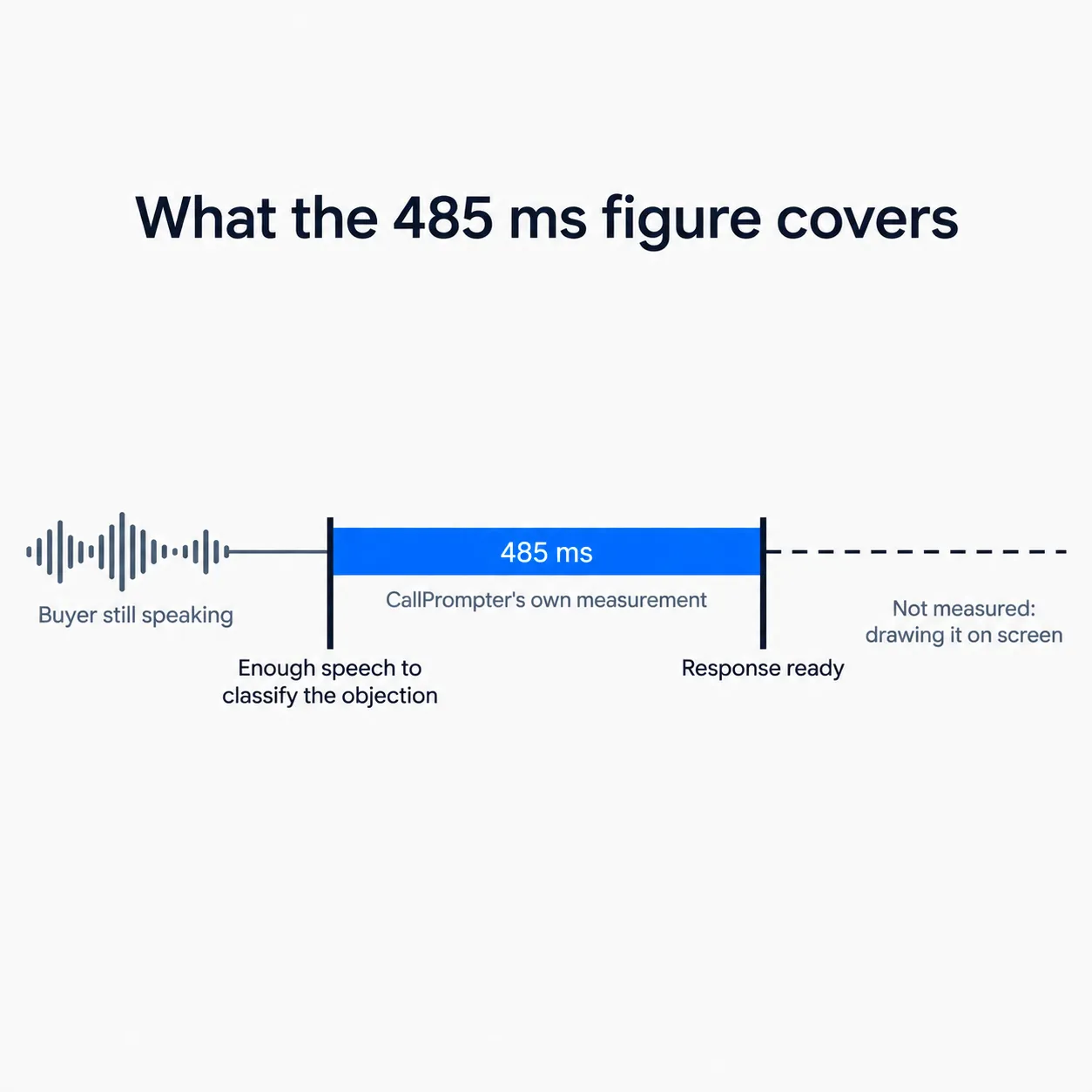
Three limits belong with that number.
- The measurement was taken on live call coaching. It is not an industry benchmark, no one else has reproduced it, and we have not measured the same interval separately inside a practice session.
- It ends when the response is ready. It is not an end-to-end figure for everything between speech and screen.
- Latency says nothing about whether the answer in your script is any good. That part is what you write.
We publish no other numbers about practice mode. There is no completion rate, no objection-coverage score and no usage statistic, because we have not run that test and will not put a date on one retroactively.
Where practice mode falls short
Two things are worth knowing before you compare us to a dedicated roleplay platform.
There is no scoring. The founder puts the gap plainly: dedicated roleplay platforms grade the run on objection handling, talk ratio and discovery coverage, and track the score over time, while CallPrompter gives you the transcript and the session replay. There is no score, no certification track and no manager report on practice.
The prompts are only as good as the script behind them. Out of the box, CallPrompter transcribes and follows the conversation. What it says is what you supply. Before a first practice call, someone adds a product, builds a script from the template and attaches a persona, and most of day one goes on that rather than on installation. The getting-started guide covers the sequence.
When practicing against a simulated buyer is worth the time
The founder’s rule of thumb: it is worth it when the conversation repeats. If you will have roughly the same call fifty more times, with the same product, the same buyer type and the same handful of objections, rehearsal compounds, and every run is a cheap version of a call you would otherwise learn on a real prospect. The inverse is the useful test. If you will not have roughly this conversation again, there is less for rehearsal to build on.
Three groups get the most out of it:
- New reps in their first weeks, who need somewhere to be wrong that is not a live prospect.
- Anyone selling in a second language, where the words matter as much as the argument.
- Teams with high onboarding volume. In recruiting and staffing, where new consultants are on the phone in week one, practice mode is usually the reason to buy rather than the extra.
If you are still comparing tools in this category, our buyer’s test for AI sales roleplay tools is the protocol we would run ourselves, including on us.
What you need, and what each plan includes
CallPrompter runs as a desktop app on macOS 14 or later, or Windows 10 or later. macOS installs by direct download, Windows installs from the Microsoft Store. You grant microphone and system-audio permission during setup, which macOS asks for twice, and that is the whole install.
| Plan | AI practice included |
|---|---|
| Free trial, 7 days, USD 0, no credit card | 30 minutes of AI practice. Live call coaching is not in the trial. |
| Starter, USD 99 per month | 24 hours of live call coaching or AI practice per month, shared across both |
| Pro, USD 249 per seat per month | Unlimited AI practice and unlimited live call coaching |
| Enterprise, from 50 seats | Custom, on a quote |
AI practice is not priced separately at any tier. Prices are in US dollars, excluding VAT, billed monthly through Stripe, and you can cancel anytime. The full plan comparison lists what else each tier includes.
Practice mode is also the only part of CallPrompter you can use before paying, because live coaching is a paid feature. Any “try it first” route into this product runs through a practice session.
Who built it
CallPrompter is built by an engineer with twenty-five years in software who found himself selling his own product with no sales training, and is operated from Switzerland.
Questions people ask about AI practice mode
Is AI practice mode included in the free trial?
Yes. The seven-day trial includes 30 minutes of AI practice and needs no credit card. Live call coaching is a paid feature and is not part of the trial.
Do I type my answers or speak them?
You speak them. A session is a voice call with the AI customer, so there is no chat box and no typing.
Does the AI buyer stay on script?
No. It interrupts, pushes back and goes off-script, which is the behavior the session is built to train.
Does CallPrompter score my practice runs?
No. You get the full transcript and a session replay in History. There is no grade, no rubric and no manager report on practice.
Which scripts does practice mode use?
The same branching scripts, personas and objection library your live calls run on. A script you fix after a real call is the script you next rehearse against.
Where is my practice session data stored?
Stored data, which covers transcripts, scripts and account data, sits on servers in Switzerland. Real-time transcription is processed by a provider based in the United States, so audio does leave Switzerland while a session is running. Full processing details are covered in the privacy policy.
What do I need to run it?
macOS 14 or later, or Windows 10 or later, plus microphone and system-audio permission. Practice runs in the desktop app rather than in a browser tab, though your scripts and personas are managed in the web application. The Chrome extension is a separate companion for pulling contacts out of your CRM.